The Woodlands, Texas Meshtastic® Community
Meshtastic® is an open-source, decentralized, off-grid mesh network built to run on affordable, low-power devices that pairs to your phone over Bluetooth and transmits your text messages across the mesh. Repeaters placed on towers, trees, and rooftops relay those messages further, extending the network’s reach across The Woodlands, Texas and beyond. Learn more at the official Meshtastic website or the Mesh101 tutorial. See also “Explain it like I’m 5 years old” found at ELi5.
No cell towers | No internet | Just pure peer-to-peer connectivity
TWTX Meshtastic is a community building a reliable communication backbone for an off-grid text messaging network across The Woodlands, North Houston, and Conroe area. Using license-free LoRa radio devices and solar-powered repeaters, people can communicate with others in the mesh with no grid power required.
Help grow this Meshtastic® community project.
JOIN NOW | Get Involved
Get Involved | Join Now | Register
Join the mesh, become a node operator, help spread the word, or become a volunteer and play a key role in “Ways to Help“. The more we grow, the stronger we become. Reach out at [email protected] with any questions.
Getting Started with Meshtastic
HARDWARE: These devices are currently in use throughout TWTX Meshtastic area
For the best results and to help the mesh grow, We recommend a combination of two devices; a small pocket-node and an outside device placed as high above the ground as possible.
In this TWTX Project, we refer to the devices as Pocket Nodes or Sky Nodes, for simplicity.
- Pocket Node – Your everyday carry device configured as Client_Mute role that sends signals (hops) to a nearby outdoor sky-node. This pocket node sends signals but it does not repeat* signals.
- Sky Node – Your outdoor node device configured as a Client_Base repeater role that repeats all signals (hops) with priority given to your pocket nodes and other household client_mute devices. Examples; Tower Node (best) Treetop Node (better), Rooftop node (good), Backyard node (fence or gutter mount placement are ok, but trees and houses will block the signal. (read Height Is Might at The Mesh Directory).
*Signal hop conservation is key. Using the client_mute role device setting is important to avoid creating hop-gobblers (i.e. client role nodes that waste hops by only pass signals around your house or your immediate neighborhood)
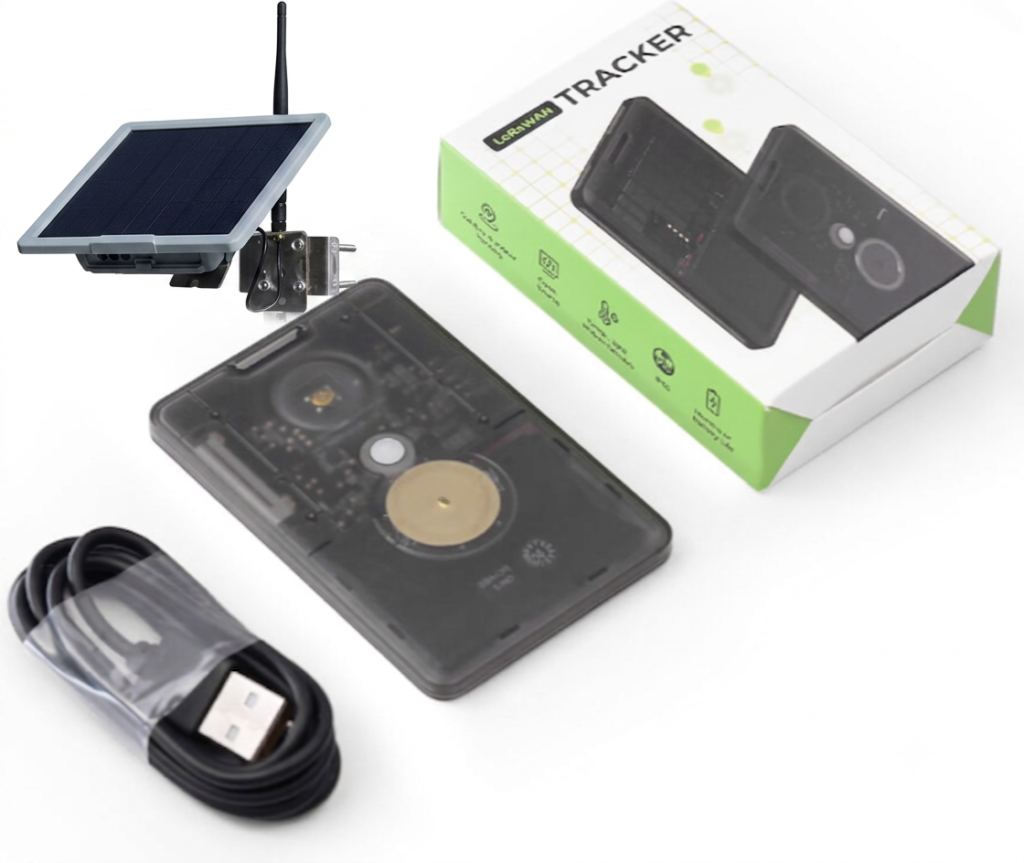
MESHTASTIC DEVICES – Choose complete turnkey solutions pre-programmed for The Woodlands Mesh or other popular mesh components that you can custom configure.
– TWTX Turnkey Solutions: Preprogrammed, Zero-Config Devices
– Pocket Nodes: Everyday carry devices that send signals repeated by sky nodes
– Sky Nodes: Devices deployed outside to repeat pocket nodes signals
TWTX Meshtastic Configuration
PENDING – New MT configuration instructions specific to The Woodlands Mesh Meshtastic (see 🛠 Member Zone)
Pocket Node Client_Base Configuration
- Connect your Meshtastic device to a computer via USB (install serial drivers if required)
- Select the proper firmware version for your device (select the appropriate device type)
- Flash the Meshtastic firmware onto your device (flasher.meshtastic.org)
- Install Android App on phone (andriod software)
- Launch Android App (onboarding user guide)
- Connect & configure your Meshtastic device (initial configuration)
- Set your region to US (regions code)
- Configure radio setting (overview)
- Setup Bluetooth for pairing to your phone (random or fixed PIN)
- Configure channels (index, roles & settings)
- Index 0 | Channel 1 | Role = Primary | LongFast PSK AQ==
- Index 1 | Channel 2 | Role = TWTXmesh | LongFast PSK [by request]
- Index 3 | Channel 3 | Role = PVTMESH001 PSK [admin]
- Set channel module (uplink, downlink, muted, position, explained)
- Device configuration (roles & values explained)
- TWTX Mesh Pocket Nodes = Client_Mute (does not repeat or waste hops)
- User configuration (long name, short name)
- TWTX LongName = MeshMap.me/node/(shortname) example
- Module configuration (MQTT, neighbors, misc)
- Module MQTT configuration (MQTT Root )
- TWTX MQTT root = msh/US/TX
- TWTX MQTT root = msh/US/TX/TheWoodlands
Sky Node Repeater Configuration
Same as Pocket Node with the exception of device configuration roles
- Device configuration (roles & values explained)
- TWTX Mesh Pocket Nodes = Client_Base (repeater)
Personal base station: always rebroadcasts packets from or to its favorited nodes. Handles all other packets like CLIENT.
- TWTX Mesh Pocket Nodes = Client_Base (repeater)
General overview of configurations non-specific to The Woodlands Mesh
Official Meshtastic.org Getting Started
GENERAL OVERVIEW: Client Configuration
To set up a Meshtastic client, install the official mobile app or open the web client, pair your LoRa radio via Bluetooth or USB, and configure your local region. [1, 2, 3]
Connecting Your Device
- Mobile App: Download the official Meshtastic app from your device’s app store (iOS or Android). Turn on phone Bluetooth, turn on your node, and select your available radio in the app, entering the pairing PIN shown on the node’s screen if required.
- Web Client: Plug your board into a computer via a USB data cable. Open a compatible browser like Chrome, navigate to the Meshtastic Web Client , click New Connection, select Serial, and pick your device’s COM port. [2, 5]
Essential Configuration
- Set Region: Navigate to Config or Radio Configuration, open the LoRa tab, and change your region (e.g., or ) from unset to your exact physical location. Save changes to reboot the node.
- Channels: The default public channel is usually . You can add encrypted private channels in the channel settings tab by naming them and saving them to your device. [4, 7]
🛠 Member Zone
TWTXmesh Community Radio & Channel Configurations:
🛠 PRESET ALERT [10-12-26] The Woodlands Mesh Meshtastic default will remain LongFast (Profile A LF20) with some new radio beacons being deployed in the area set to LongTurbo (Profile B LT14) in order to alert New Meshtastic Users.
New Meshtastic Default Presets Firmware 2.8.1 [10/08/26 update]
LongTurbo 500 kHz is now the Meshtastic default preset. (official announcement | let’s talk 2.8.1)
In the US, a brand new node that you set to the US region for the first time, it defaults to Long Turbo rather tan LongFast. Long Turbo uses a 500 kHz wide channel instead of 250 kHz, which is what the FCC rules want for full power on 902-928 MHz. A node on the new Long Turbo preset can’t hear nodes on original LongFast or other presets at all. See Mesh500.org for more info and to search other mesh communities.
THE WOODLANDS MESH PROJECT default is still LongFast with some radio beacons in the area set to LongTurbo to alert New Meshtastic Users. More about the beacon nodes later.
Meshtastic: Preset | Frequency | Bandwidth | Spreading Factor | Coding Rate | Path Hash
TWDSmesh RADIO PROFILES
Profile A (original default) | Profile B (new default FCC compliant)
| Profile A (share profile link) | TWDS primary (LF20 original blend) |
|---|---|
| Region | US |
| Preset | Long_Fast |
| Frequency Slot | 20 |
| Frequency | 906.875 |
| Hop Limit | 3 |
| Transmit Power | 30 dBm |
FCC Compliant 500 kHz Profile B
| Profile B (share profile link) | TWDS LT14 (Meshtastic Default 2.8.0+) |
|---|---|
| Region | US |
| Preset | Long_Turbo |
| Frequency Slot | 14 |
| Frequency | 908.750 |
| Hop Limit | 3 |
| Transmit Power | 30 dBm |
POCKET NODE – Configuration for hand-held devices. These are nodes that you carry with you, in your pocket, bag, belt, mounted on your car, and so on.
- Role: CLIENT_MUTE
- Position: disabled, or enable smart position smart interval 30 minutes or more
update distance 100 m or more disable altitude - GPS polling interval: 30 minutes or longer Telemetry: off
- Device info: 19 hour interval or longer (68,400 seconds)
- Region: US
- Presets: LONG-FAST (LF20 original default)
- Hops: 3 (pocket node)
- Frequency Slot: 20
- Frequency (rf): 906.875
- Transmit Power: 30
- Bandwidth (bw): 250 kHz
SKY NODE – Configuration for rooftop, treetop, buildings & towers devices. These are nodes that are stationary and positioned as high as possible to repeat signals.
- Role: CLIENT_BASE
- Position: disabled, or enable smart position smart interval 30 minutes or more
update distance 100 m or more disable altitude - GPS polling interval: 30 minutes or longer Telemetry: off
- Device info: 19 hour interval or longer (68,400 seconds)
- Region: US
- Presets: LONG-FAST (LF20 original default)
- Hops: 3 (sky node)
- Frequency Slot: 20
- Frequency (rf): 906.875
- Transmit Power: 30
- Bandwidth (bw): 250 kHz
🛠 TWTX Community Support
TWTX Community members can solicit help from fellow mesh community volunteers by sending a help requests with results posted to a members only support forum.
RESOURCE;
[1] https://www.youtube.com/watch?v=knfJwfvbq1M
[2] https://www.youtube.com/shorts/104ve6pzaHI
[3] https://meshtastic.org/docs/getting-started/
[4] https://www.youtube.com/watch?v=smQALUBiJ8s&vl=en-US
[5] https://store.rokland.com/pages/meshtastic-web-client-device-config-guide
[6] https://meshtastic.org/docs/getting-started/initial-config/
[7] https://docs.rakwireless.com/product-categories/meshtastic/meshtastic-basic-device-setup